Billing on Comfy Cloud
Last updated: May 20, 2026
⚠️ Note: This article is for Comfy Cloud users.
FAQ for ComfyUI Local — all open-source versions such as the desktop app, manual, or portable setups via GitHub — is coming soon.
See also : Q. How is Comfy Cloud different from the regular ComfyUI?
Q. How is Comfy Cloud pricing structured? How much does it cost to run?
A. ComfyUI has two types of pricing:
1. API Credits (Pay-as-you-go & Top-up)
- Run third-party models via API calls in any environment (Comfy Cloud or ComfyUI Local).
- Each node’s cost matches the pricing set by the API provider.
2. Comfy Cloud Subscription (Cloud only)
💡 For Public Beta — subscription fee only : $20 per month!
- $20/month includes $10 in API credits, usable in both Comfy Cloud and ComfyUI Local.
- During the Public Beta, there’s no GPU usage tracking — users are only billed the flat monthly subscription fee.
- You’re only charged for active GPU use — no idle fees, setup, or infrastructure costs.
- At this stage, Comfy Cloud offers a single subscription plan, with more options to be introduced in the future.
- → For details on usage limits, see System Constraints & Usage Limits!
👉 Check the latest pricing information here : 🔗Comfy Cloud Pricing
💡 New pricing plans coming from Dec 8th, 2025
Starting on Dec 8th, 2025, we will have several pricing plans available. Existing subscribers will get a Founder’s edition subscription, which contains a 30% bump in monthly credits as long as you have an active Standard subscription.
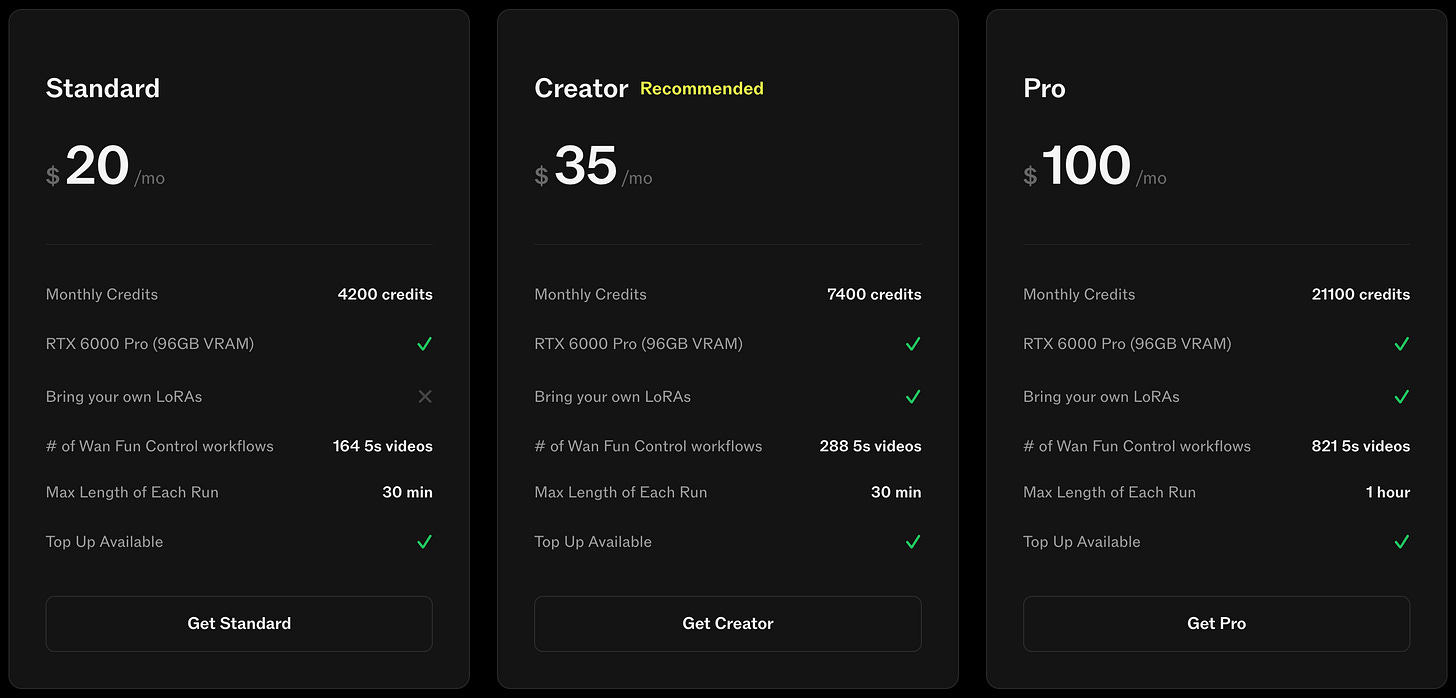
For more details on new plans, please see : Comfy Cloud Updates (Dec 8, 2025): New Features & Pricing Changes
Q. How does billing work for Comfy Cloud?
A. During the Public Beta, there’s no GPU usage tracking. Users are only charged the $20 monthly subscription fee, with flat access and fair daily limits to help ensure stable performance for everyone.
For the detailed limitation, please refer to System Constraints & Usage Limits!
Q. How is usage measured for billing?
A. Usage refers to the time your workflows are running on the GPU — not while editing or building them. There are no idle costs, no infrastructure to manage on your end.
Q. How is my API credit balance managed? When do credits expire, and in what order are they used?
A. At this stage, Comfy Cloud uses a top-up credit system, and your API credit usage is deducted from your existing balance following these rules:
-
Monthly allowance — API Credits from your Comfy Cloud subscription — are used first.
- They expire at the end of the month and are renewed to $10 (the monthly subscription allowance) if you keep subscribing.
- Accordingly, unused subscription credits do not roll over to the next month.
-
Additional top-up API Credits — Credits you manually purchased apart from the Cloud subscription — are used only after the monthly allowance is consumed.
- These top-up credits are valid for 1 year from the date of purchase.
💡 You can use API credits on both Comfy Cloud and ComfyUI Local, regardless of where they were topped up — including those from your monthly subscription.
Q. What payment methods are supported?
A. Payments are currently handled via Stripe, where you can use various payment methods including major global cards (e.g., Visa, Mastercard, American Express) and supported bank accounts.
For more details, you can simply check the checkout page of Comfy Cloud — whether you’re subscribing or topping up API credits.
Q. Is the subscription automatically renewed?
A. Yes — your monthly subscription will be automatically renewed unless you cancel it.
The renewal will be processed based on your registered payment method.
Q: How do I request a refund?
A. You can contact our support team by submitting a ticket at support.comfy.org. Refunds are processed internally, so please allow some time for our team to review and respond.
Q. The “Manage subscription” button isn’t working — what should I do?
A. If the “Manage subscription” button doesn’t respond when you click it, it’s usually because your browser is blocking pop-ups.
The billing portal opens in a new pop-up window, so it won’t load if pop-ups are disabled.
To fix this:
Check your browser’s pop-up settings
Allow pop-ups for
comfy.org(or the page you’re on)Try clicking the button again
If the issue continues even after enabling pop-ups, feel free to reach out to our support team by submitting a ticket at support.comfy.org.
Q. How long does it take to process a refund once it’s approved?
A. Our team is working hard to process requests as quickly as possible. However, due to the high volume of inquiries during the Comfy Cloud Public Beta, we are not able to guarantee a specific turnaround time at this stage. Once your refund request has been submitted, please rest assured it won’t be lost — and we appreciate your patience.
Q. What is the refund policy for Comfy Cloud? In what cases can I request a refund?
A. During the Beta period, Comfy Cloud subscriptions are handled differently from pay-as-you-go API credits.
If you choose to cancel your subscription, all future automatic payments will stop immediately, but your current plan will remain active until the end of the billing period you’ve already paid for.